AJAX – DJC Sitemap 網站地圖:打造 Google 友善的 SEO 基礎
這款 AJAX – DJC Sitemap 網站地圖外掛,完美整合了多種內容來源。它不僅能有效解決複合型網站的索引問題,更能確保網站內容能被 Google 等搜尋引擎正確、完整地收錄,是 網站優化 的必備利器。
與傳統的網站地圖不同,這款外掛能將 DJ-Catalog2 的產品頁、Joomla 文章與選單等內容一次收錄。它會生成符合搜尋引擎規範的 XML 格式,並支援 Sitemap Index 分頁,讓大型網站也能順暢運行。這款模組讓你的 網頁設計 不再因內容多樣性而受限,確保你的網站不僅美觀,更具備高度的搜尋引擎友好性。
AJAX – DJC Sitemap 網站地圖
Joomla 4 / 5 下載
(1) DJC Sitemap 網站地圖 外掛特色
多來源整合:涵蓋 DJ-Catalog2(產品/分類/製造商)、Joomla 文章、Joomla 前台選單。
硬性 XML 輸出:
format=raw會清空輸出緩衝、正確送出Content-Type: application/xml,避免 Search Console 誤判成 HTML。Sitemap Index 分頁:大站自動分頁(預設每頁 5,000 筆),搜尋引擎可循索引抓完整清單。
HTML 索引頁:
format=html&type=index產出可點表格,方便人工檢視;也提供各分頁類型的 HTML 預覽。即時同步:不需手動重建檔案,內容更新即反映。
SEF/Itemid 友善:可強制套用指定 Itemid,確保 DJ-Catalog2 連結走對選單脈絡。
相容多表結構:自動偵測可用日期欄位(例如
modified_time / created_time / modified / created),穩定填入lastmod。
(2) 可設定參數
此介面讓您設定 Sitemap 的內容來源與行為。
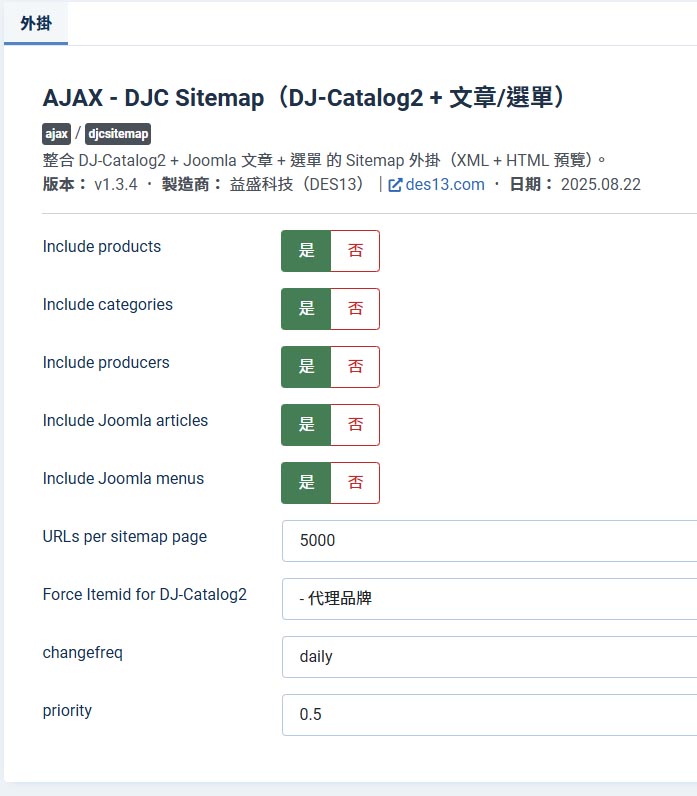
內容來源選項:
Include products (是否包含產品):選擇是否將 DJ-Catalog2 網站中的產品頁面納入 Sitemap。
Include categories (是否包含分類):選擇是否將 DJ-Catalog2 的產品分類頁面納入 Sitemap。
Include producers (是否包含製造商):選擇是否將 DJ-Catalog2 的製造商頁面納入 Sitemap。
Include Joomla articles (是否包含 Joomla 文章):選擇是否將 Joomla 內建的內容納入 Sitemap。
Include Joomla menus (是否包含 Joomla 選單):選擇是否將網站前台的選單項目納入 Sitemap。
Sitemap 設定選項:
URLs per sitemap page (每頁網址數):預設值為 5000。此欄位用於設定每個 Sitemap 分頁檔案的網址數量,以符合 Google 的最佳實踐。
Force Itemid for DJ-Catalog2 (強制指定 DJ-Catalog2 的選單 ID):此選項確保所有 DJ-Catalog2 產品連結使用特定的選單 ID,避免重複網址問題。
changefreq (更新頻率):預設值為 daily。此為建議值,用來告訴搜尋引擎頁面內容的預計更新頻率。
priority (優先權):預設值為 0.5。值介於 0.0 到 1.0 之間,用來表示頁面相對於其他頁面的重要性。
(3) 適用場景
- 同站並存「產品內容」與「文章內容」,希望一份 Sitemap 全收錄。
- 需要穩定 XML 供 Google/Bing 抓取,同時要人類可讀的檢視頁。
- 大量頁面、需要分頁與即時更新的網站。
(4) 安裝與啟用
- 後台 → 擴充功能 → 安裝 → 上傳
plg_ajax_djcsitemap_v1.3.4.zip。 - 在外掛管理頁面啟用 AJAX – DJC Sitemap。
- 於外掛設定勾選要包含的來源、調整每頁數與
changefreq/priority;必要時設定 Force Itemid。

(5) 常用網址
XML Sitemap Index(提交搜尋引擎):
https://你的網域/index.php?option=com_ajax&plugin=djcsitemap&format=raw&type=indexHTML 索引頁(人看):
https://你的網域/index.php?option=com_ajax&plugin=djcsitemap&format=html&type=index
(6) 設立短網址
將 Sitemap 設定為短網址,不僅能讓網址看起來更專業,也方便提交給 Google Search Console。這通常需要在你的網站後台建立一個自訂連結,將長網址轉換為短網址。
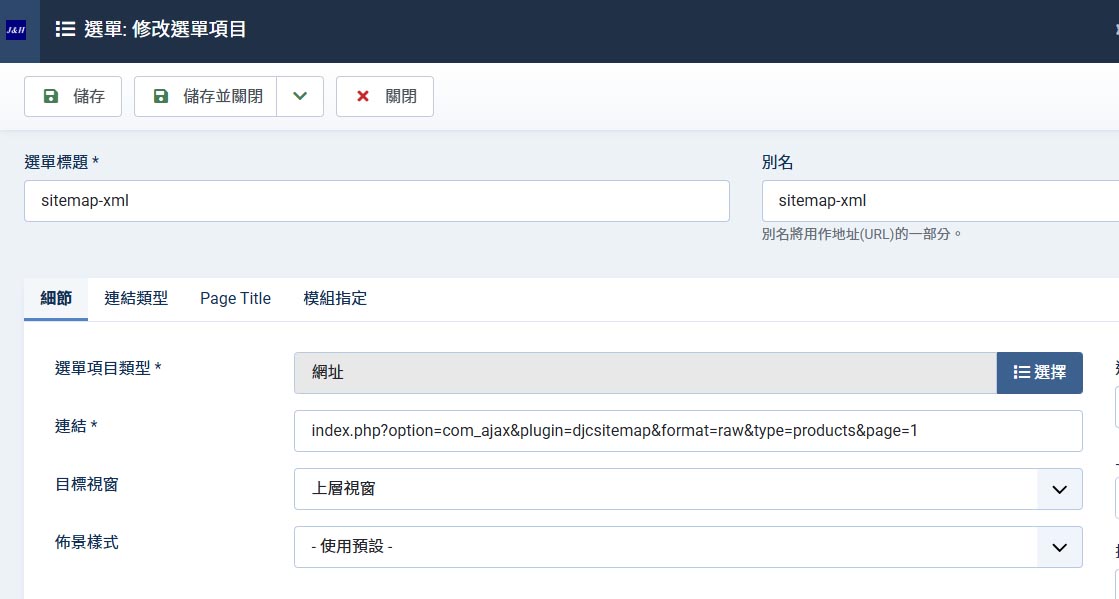
以下是將 Sitemap 設立為短網址的教學步驟:
建立一個新的「選單項目」:
在 Joomla 後台,前往 選單 (Menus) → 主選單 (Main Menu) 或其他選單,點擊「新增 (New)」按鈕。設定選單項目類型為「網址」:
選單標題:Sitemap或sitemap.xml。
別名:sitemap.xml。此別名將成為短網址的一部分。
選單項目類型:選擇「外部 URL (External URL)」。填入 Sitemap 的長網址:
將長網址index.php?option=com_ajax&plugin=djcsitemap&format=raw&type=index貼入「連結 (Link)」欄位。儲存並檢查網址:
點擊「儲存 (Save)」,你的短網址將會是https://你的網域/index.php/sitemap-xml。提交給 Google Search Console:
將短網址提交到 Google Search Console,讓 Google 快速找到並索引你的 Sitemap。
(7) Search Console 與 robots.txt
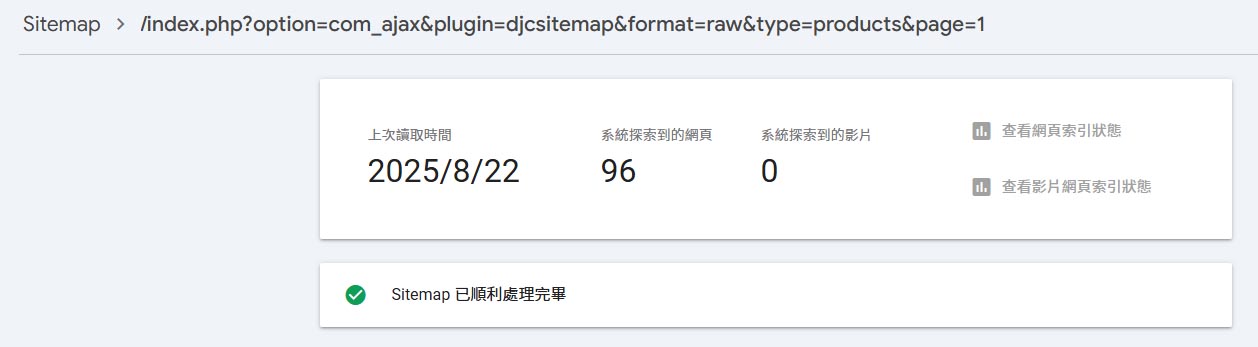
在 Google Search Console 的 Sitemap 頁面,提交你的短網址:
https://你的網域/index.php/sitemap-xml。在
robots.txt檔案中加入:Sitemap: https://你的網域/index.php/sitemap-xml。
AJAX – DJC Sitemap: Building a Google-Friendly Foundation for SEO
This AJAX – DJC Sitemap plugin seamlessly integrates various content sources. It not only effectively solves indexing issues for complex websites but also ensures your content is correctly and completely indexed by Google and other search engines, making it an essential tool for website optimization.
Unlike traditional sitemaps, this plugin can include content from **DJ-Catalog2** product pages, Joomla articles, and menu items all at once. It generates XML formatted to search engine standards and supports Sitemap Index pagination, ensuring large websites run smoothly. This module means your web design is no longer limited by content diversity, guaranteeing your site is not only beautiful but also highly search engine friendly.
AJAX – DJC Sitemap Plugin
Joomla 4 / 5 Download
(1) DJC Sitemap Plugin Features
Multi-Source Integration: Covers DJ-Catalog2 (products / categories / manufacturers), Joomla articles, and Joomla frontend menus.
Strict XML Output:
format=rawclears the output buffer and correctly sendsContent-Type: application/xml, preventing Search Console from misidentifying it as HTML.Sitemap Index Pagination: Automatically paginates for large sites (default 5,000 URLs per page), allowing search engines to follow the index and crawl the full list.
HTML Index Page:
format=html&type=indexgenerates a clickable table for easy human viewing; it also provides HTML previews for different page types.Real-Time Sync: No need to manually rebuild files; content updates are reflected instantly.
SEF / Itemid Friendly: Can force a specific Itemid to ensure DJ-Catalog2 links follow the correct menu structure.
Multi-Table Structure Compatibility: Automatically detects available date fields (e.g.,
modified_time / created_time / created / modified) to reliably populatelastmod.
(2) Configurable Parameters
This interface allows you to set the content sources and behavior of the Sitemap.
Content Source Options:
Include products: Choose whether to include product pages from the DJ-Catalog2 website in the Sitemap.
Include categories: Choose whether to include product category pages from DJ-Catalog2 in the Sitemap.
Include producers: Choose whether to include producer pages from DJ-Catalog2 in the Sitemap.
Include Joomla articles: Choose whether to include built-in Joomla content in the Sitemap.
Include Joomla menus: Choose whether to include frontend menu items in the Sitemap.
Sitemap Settings:
URLs per sitemap page: Default value is 5000. This field sets the number of URLs for each Sitemap file, adhering to Google's best practices.
Force Itemid for DJ-Catalog2: This option ensures all DJ-Catalog2 product links use a specific menu ID, avoiding duplicate URL issues.
changefreq: Default value is daily. This is a recommended value to tell search engines the expected update frequency of the page content.
priority: Default value is 0.5. A value between 0.0 and 1.0 that indicates a page's importance relative to other pages on the site.
(3) Applicable Scenarios
- Websites with both "product content" and "article content" that need to be fully included in a single Sitemap.
- Sites that need a stable XML for Google/Bing crawling, as well as a human-readable view page.
- Websites with a large number of pages that require pagination and real-time updates.
(4) Installation and Activation
- Backend → Extensions → Install → Upload
plg_ajax_djcsitemap_v1.3.4.zip. - Enable the AJAX – DJC Sitemap plugin on the plugin management page.
- In the plugin settings, select the sources to include, adjust the number of pages, and set
changefreq/priority; set the Force Itemid if necessary.
(5) Common URLs
XML Sitemap Index (for search engine submission):
https://yourdomain.com/index.php?option=com_ajax&plugin=djcsitemap&format=raw&type=indexHTML Index Page (for human viewing):
https://yourdomain.com/index.php?option=com_ajax&plugin=djcsitemap&format=html&type=index
(6) Setting Up a Short URL
Setting up a short URL for your **Sitemap** not only makes the URL look more professional but also makes it easier to submit to Google Search Console. This typically involves creating a custom link in your website's backend to convert the long URL into a short one.
Here are the steps to set up a short URL for your Sitemap:
Create a new "Menu Item":
In the Joomla backend, navigate to Menus → Main Menu or another menu, and click the "New" button.Set the menu item type to "URL":
Menu Title:Sitemaporsitemap.xml.
Alias:sitemap.xml. This alias will become part of the short URL.
Menu Item Type: Select "External URL".Enter the long Sitemap URL:
Paste the long URLindex.php?option=com_ajax&plugin=djcsitemap&format=raw&type=indexinto the "Link" field.Save and check the URL:
Click "Save", and your short URL will behttps://yourdomain.com/index.php/sitemap-xml.Submit to Google Search Console:
Submit the short URL to Google Search Console to help Google quickly find and index your Sitemap.
(7) Search Console and robots.txt
On the Sitemaps page in Google Search Console, submit your short URL:
https://yourdomain.com/index.php/sitemap-xml.Add the following line to your
robots.txtfile:Sitemap: https://yourdomain.com/index.php/sitemap-xml.
網站地圖 常見問題 / Frequently Asked Questions (FAQ)
Q1: 什麼是 Sitemap?為什麼我的網站需要它?
A:
Sitemap 就像是網站的目錄,它列出了網站中所有重要頁面的網址。
擁有一個 Sitemap,可以幫助 Google 和其他搜尋引擎更有效率地發現、抓取並索引你的網站內容,對於提升 SEO 排名非常重要,尤其是在網站內容龐大或更新頻繁時。
Q1: What is a Sitemap? Why does my website need one?
A Sitemap is like a directory for your website; it lists all the URLs of your site's important pages. Having a Sitemap helps Google and other search engines discover, crawl, and index your website content more efficiently, which is crucial for improving SEO rankings, especially for websites with a large volume of content or frequent updates.
Q2: AJAX – DJC Sitemap 外掛與傳統的網站地圖有什麼不同?
A:
傳統的 Sitemap 外掛通常只收錄基本的 Joomla 文章或選單頁面。
AJAX – DJC Sitemap 外掛的獨特之處在於,它能無縫整合多種內容來源,特別是 DJ-Catalog2 的產品、分類和製造商頁面,讓所有不同類型的內容都能被一次性收錄到同一份 Sitemap 中,解決了複合型網站的索引問題。
Q2: How is the AJAX – DJC Sitemap plugin different from a traditional sitemap?
Traditional sitemap plugins usually only include basic Joomla articles or menu pages. However, the unique feature of the AJAX – DJC Sitemap plugin is its seamless integration with multiple content sources, particularly DJ-Catalog2 products, categories, and manufacturer pages. This allows all content types to be included in a single Sitemap, solving the indexing problems of complex websites.
Q3: 為什麼這款外掛能避免 Google Search Console 誤判成 HTML?
A:
這款外掛的「硬性 XML 輸出」功能是關鍵。
它使用 format=raw 命令,會強制清除所有輸出緩衝,並設定正確的 Content-Type: application/xml 標頭。這確保了伺服器傳送給 Google 的內容格式是純 XML,不會夾帶任何 HTML 程式碼,從而避免了 Search Console 誤將 Sitemap 視為 HTML 網頁而導致錯誤。
Q3: Why does this plugin prevent Google Search Console from misidentifying it as HTML?
The "Strict XML Output" feature of this plugin is key. It uses the format=raw command to forcefully clear all output buffers and set the correct Content-Type: application/xml header. This ensures the server sends pure XML content to Google, without any accompanying HTML code, thus preventing Search Console from misinterpreting the Sitemap as an HTML page and causing errors.
Q4: 為什麼要將 Sitemap 網址設為短網址?
將 Sitemap 網址設為短網址(例如:sitemap.xml),有兩個主要優點:
1. 它讓網址看起來更簡潔、專業,方便您記憶和手動提交;
2. 這類短網址更符合搜尋引擎的慣用格式,有助於 Google Search Console 更順利地讀取和處理 Sitemap,提升索引效率。
Q4: Why should I set up a short URL for my Sitemap?
Setting up a short URL for your Sitemap (e.g., sitemap.xml) has two main benefits: First, it makes the URL look cleaner and more professional, making it easier for you to remember and submit manually. Second, these short URLs align better with the search engines' standard format, helping Google Search Console to read and process your Sitemap more smoothly and efficiently, improving indexing speed.
Q5: 這款外掛如何幫助大型網站的 SEO?
對於大型網站而言,Sitemap 檔案可能會超過 Google 規定的 50,000 個網址上限。
這款外掛具備「Sitemap Index 分頁」功能,會自動將 Sitemap 拆分成多個小檔案(預設每頁 5,000 筆)。您只需將 Sitemap Index 提交給 Google,它就會自動循著索引抓取所有分頁,確保網站所有內容都能被完整收錄,避免遺漏。
Q5: How does this plugin help with SEO for large websites?
For large websites, a single Sitemap file might exceed Google's limit of 50,000 URLs. This plugin features "Sitemap Index Pagination," which automatically splits the Sitemap into multiple smaller files (defaulting to 5,000 URLs per page). You only need to submit the main Sitemap Index to Google, and it will automatically follow the index to crawl all the individual pages, ensuring that all of your website's content is fully indexed without any omissions.