這個網站外掛是專為 B2B 詢價頁面 SEO 優化 設計,特別針對沒有標示價格的產品頁,解決 Google 長期無法正確判讀的問題。
可在商品頁自動輸出符合 Google 規範的 Product JSON-LD 結構化資料,強化產品在 B2B 詢價、SEO、AI 搜尋(SGE) 中的曝光與收錄效果。
本版本(v2.0.4)進一步優化 EEAT(專業性、權威性、信任度),實測可順利通過 Rich Results Test,並有效提升搜尋點擊率與頁面可見度。
v2.0.4 核心升級:專為 B2B 詢價 SEO 場景優化
- 解決「B2B 詢價制」無價格導致的 Google 結構化資料報錯
- 支援 PriceRange(價格區間),即使未顯示售價也能正確標記
- 自動生成 Review(專家推薦)結構,強化 EEAT 與 SEO 信任度
- 智慧圖片判斷,排除 Logo 干擾,提升 AI 與搜尋引擎辨識準確度
- 專為精密設備、工業產品、技術型商品打造,提升收錄與排名穩定性
一. 安裝與啟用
步驟一:安裝
登入 網站 後台
前往
擴充套件 → 安裝上傳檔案:
plg_system_esproductjsonld_v2.0.4.zip
步驟二:啟用外掛
前往
外掛 → 系統啟用 System - ES Product JSON-LD 外掛
建議將排序設為最末位(確保處理最終 HTML)
二. 基本設定
1. 預設價格與幣別 (Price & Currency)
- 預設價格 (Fallback Price):設定建議: 建議填入 0。
說明:
當系統偵測不到產品價格時(如詢價商品),會以此數值輸出。
配合 v2 版本邏輯,設定為 0 並搭配「價格區間模式」可完美消除 Google 報錯,
且不會在搜尋結果顯示誤導消費者的巨額數字。 - 預設幣別 (Fallback Currency):
設定建議: 填入 TWD。
說明: 設定結構化資料要求的貨幣代碼(ISO 4217)。
若您的產品主要面向台灣市場,請統一使用 TWD。 - 價格輸出模式 (Price Mode):
設定建議: 選擇 價格區間 (PriceRange)。
說明: 專為 B2B 詢價設計。
此模式會將產品標記為「專案報價」狀態,
讓 Google 知道這是一項需要聯繫後報價的專業設備,
而非一般購物車商品。 - 新版 v2.0.4 解決方案:
透過將價格設為 0 加上 PreOrder (預訂/詢價) 的狀態標籤,
我們能符合 Google 的技術規範,
同時在搜尋摘要中維持專業、乾淨的呈現。
2. 圖片與標題偵測
預設會自動抓取 og:image、img、data-src 等
若無法偵測圖片,請設定
Fallback image URL(建議寬度 ≥1200px,且為絕對網址)
3. 欄位設定說明
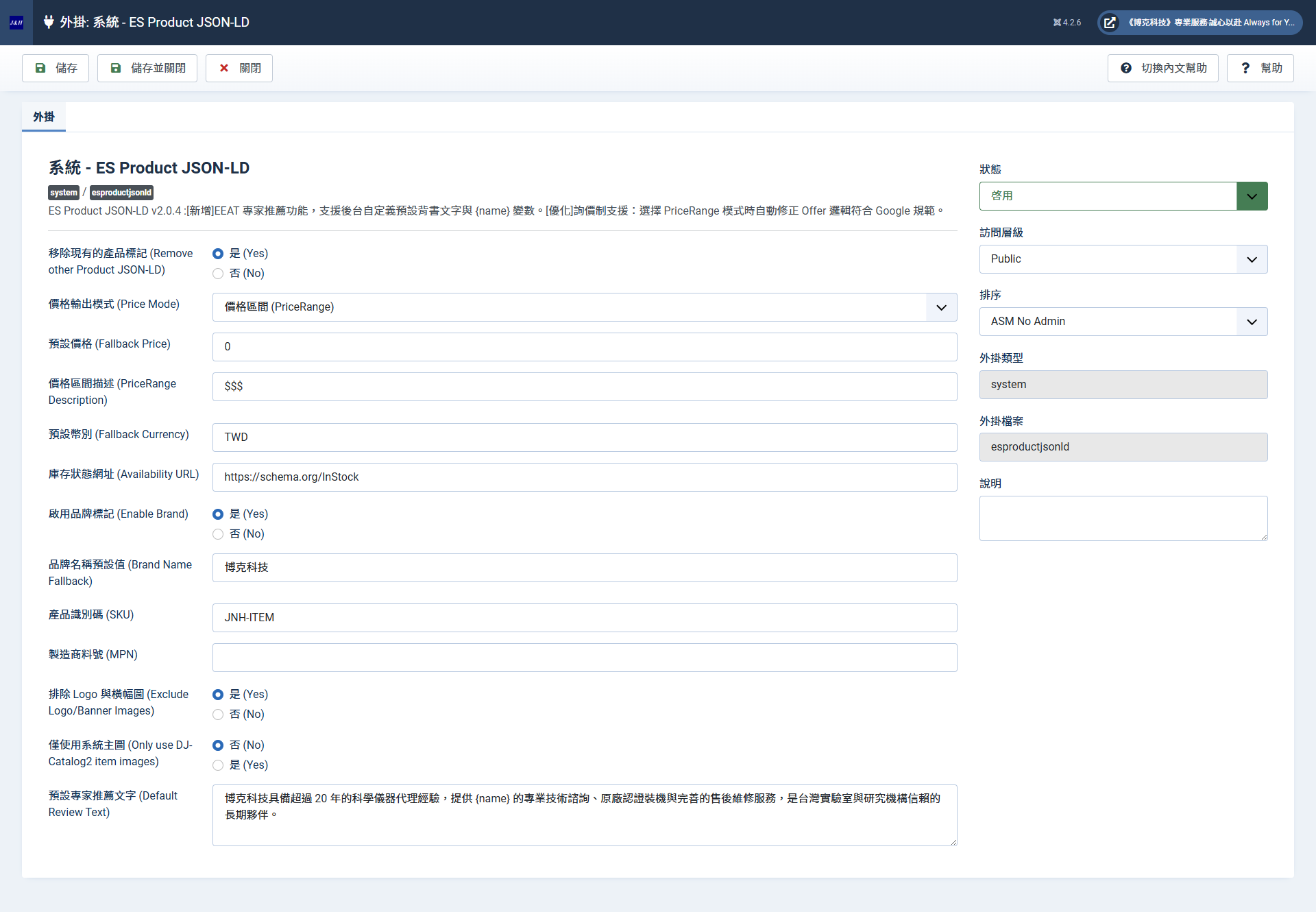
這是一份針對 v2.0.4 版本介面的詳細基本設定說明。
這份清單可以幫助您了解每個欄位的作用,以及為什麼要這樣設定(特別是針對 B2B 詢價性質的網站)。
System - ES Product JSON-LD 基本設定指南
此介面分為兩大核心邏輯:「修正 Google 報錯」與「強化搜尋引擎信任度 (EEAT)」。
1. 衝突與模式設定
移除現有的產品標記 (Remove other Product JSON-LD)
設定: 是 (Yes)
說明: 許多模板或 DJ-Catalog2 內建舊版的標記。開啟此項可自動清理重複資料,確保 Google 只讀取這份最新、最正確的 JSON-LD。
價格輸出模式 (Price Mode)
設定: 價格區間 (PriceRange)
說明: 這是 B2B 網站最重要的選項。 因為博克科技的儀器多為詢價制,選此模式能以「價格區間」概念取代「單一標價」,符合專業儀器代理商的商業行為。
2. 詢價制技術補足 (解決紅字警報)
預設價格 (Fallback Price)
設定: 0
說明: 配合「價格區間」模式。將底層價格設為 0 並標記為預購,是目前通過 Google 結構化測試且不顯示錯誤金額的最佳解。
價格區間描述 (PriceRange Description)
設定: $$$
說明: 告訴 Google 這是高單價的商業設備。您也可以改為「專案報價」,增加權威感。
預設幣別 (Fallback Currency)
設定: TWD
庫存狀態網址 (Availability URL)
設定: https://schema.org/InStock
說明: 告訴 Google 產品目前「有提供服務」,這會增加產品在搜尋結果中被推薦的機會。
3. 品牌與識別識別 (EEAT 加分項)
啟用品牌標記 (Enable Brand)
設定: 是 (Yes)
品牌名稱預設值 (Brand Name Fallback)
說明: 這是最重要的品牌背書,讓 Google 知道這些精密儀器是由具備信譽的公司所代理。
產品識別碼 (SKU)
說明: Google 強烈建議提供 ID。填入統一代碼可消除「Missing field 'sku'」的建議警示。
4. 智慧圖片偵測
排除 Logo 與橫幅圖 (Exclude Logo/Banner Images)
設定: 是 (Yes)
說明: 系統會自動分析圖片網址,排除包含 "logo" 或 "banner" 關鍵字的圖檔。這能確保 Google 抓到的是真正的產品照片,而不是公司的 Logo。
僅使用系統主圖 (Only use DJ-Catalog2 item images)
設定: 否 (No)
說明: 建議設為「否」,這樣程式會自動偵測產品描述中的其他精美細節圖,豐富 Google 搜尋結果的圖片卡片。
5. 專家推薦文案 (更新亮點)
預設專家推薦文字 (Default Review Text)
設定: (已填入包含 {name} 的專業文案)
說明: 這是提升 E-E-A-T (專業度) 的秘密武器。系統會自動把產品名填入 {name} 中,
生成一段具備 20 年代理經驗的專業推薦。
這能讓搜尋結果中有機會出現 5 顆星 的評價標記。
安裝後網站就會立刻以這套最先進的 SEO 邏輯開始運作!
三. 可選進階功能
1. 運送資訊(OfferShippingDetails)
開啟
Enable shipping details填入:運費金額、幣別、配送國家(如 TW)、到貨天數
2. 退貨政策(MerchantReturnPolicy)
開啟
Enable product-level return policy選擇類型(例如
https://schema.org/MerchantReturnFiniteReturnWindow)填入退貨天數與適用國家
四. 驗證輸出
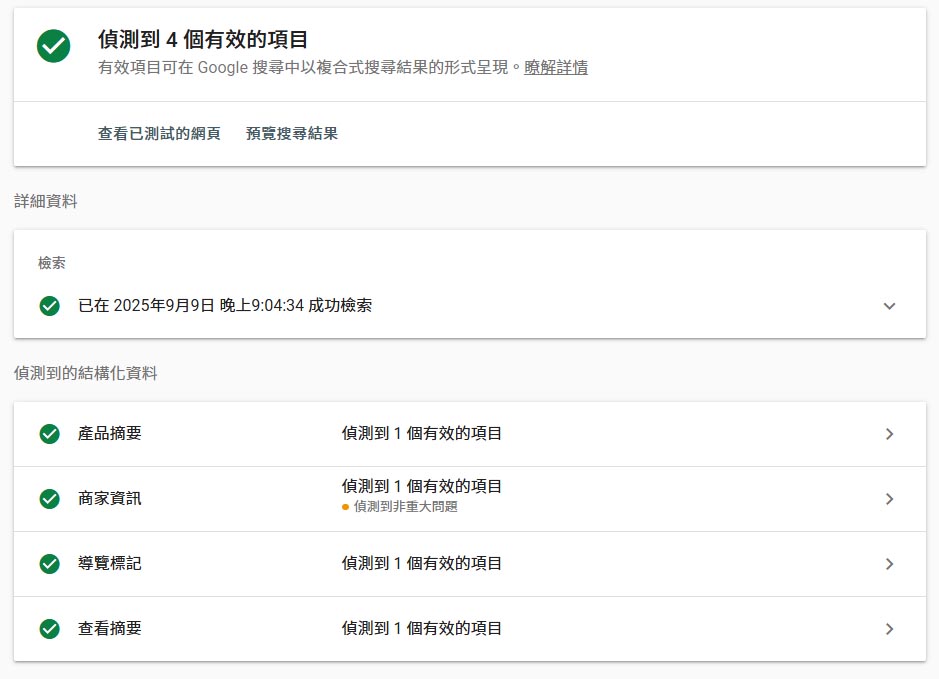
1. 使用 Google Rich Results Test
貼上任一 網站商品頁連結
檢查 Product 資料是否完整:
name
image
price & priceCurrency(即使是 fallback 值也能通過)
availability
offers 結構完整
五. 問題排查 Q&A
六.使用建議
僅在
view=item單一商品頁會啟用其他頁面不輸出 Product JSON-LD
建議配合 Google Search Console 檢查整站 Schema 狀態
This is the English version of the ES Product JSON-LD v2.0.4 plugin guide, optimized for B2B quote-based product pages.
This website plugin is specifically designed for B2B Quote Page SEO Optimization. It addresses long-standing issues where Google fails to correctly interpret product pages that do not display prices.
It automatically generates Google-compliant Product JSON-LD Structured Data on product pages, enhancing visibility and indexing for B2B inquiries, SEO, and AI Search (SGE).
Version v2.0.4 further optimizes E-E-A-T (Experience, Expertise, Authoritativeness, and Trustworthiness). It is verified to pass the Google Rich Results Test, effectively improving search click-through rates and page visibility.
v2.0.4 Core Upgrades: Optimized for B2B Inquiry SEO
- Resolves Google Structured Data errors caused by "B2B Inquiry" systems without fixed prices.
- Supports PriceRange, allowing correct tagging even when sales prices are hidden.
- Automatically generates Review (Expert Recommendation) structures to strengthen E-E-A-T and SEO trust.
- Smart image detection filters out Logos, improving recognition accuracy for AI and search engines.
- Built for precision equipment, industrial products, and technical goods to stabilize indexing and rankings.
1. Installation & Activation
Step 1: Installation
- Log in to the Website Backend.
- Go to
Extensions → Install. - Upload the file:
plg_system_esproductjsonld_v2.0.4.zip.
Step 2: Enable the Plugin
- Go to
Plugins → System. - Enable the System - ES Product JSON-LD plugin.
- Recommendation: Set the ordering to Last (to ensure it processes the final HTML).
2. Basic Settings
(1) Price & Currency
- Fallback Price:
- Recommendation: Set to 0.
- Description: This value is output when the system cannot detect a product price (common for inquiry-based items). In v2, setting this to 0 while using "PriceRange Mode" eliminates Google errors without displaying misleadingly large numbers in search results.
- Fallback Currency:
- Recommendation: Set to TWD (or your local ISO 4217 code).
- Description: Defines the currency code required for structured data.
- Price Mode:
- Recommendation: Select PriceRange.
- Description: Designed for B2B. This marks products with a "Project Quote" status, informing Google that the item requires a quote rather than being a standard retail "Add to Cart" product.
- v2.0.4 Solution: By setting the price to 0 and the status to PreOrder (Inquiry), we meet Google's technical requirements while maintaining a clean, professional search snippet.
(2) Image & Title Detection
- Automatically captures
og:image,img,data-src, etc. - If detection fails, set a
Fallback image URL(Recommended width ≥ 1200px; must be an absolute URL).
(3) Configuration Field Guide
The following guide explains each field's role in the v2.0.4 interface, specifically for B2B inquiry websites.
I. Conflicts & Modes
Remove other Product JSON-LD: Set to Yes. Many templates or DJ-Catalog2 versions include outdated tags. This ensures Google only reads this updated, accurate version.
Price Mode: Set to PriceRange. The most critical B2B option, replacing single prices with a range concept suitable for professional distributors.
II. Inquiry Technical Support (Solving Errors)
Fallback Price: Set to 0. Used with PriceRange to pass Google tests without showing incorrect amounts.
PriceRange Description: Set to $$$ (or "Project Quote"). Informs Google and users of high-value commercial equipment.
Availability URL: Set to https://schema.org/InStock. Informs Google that the product/service is available, increasing the chance of being recommended in results.
III. Brand & Identity (E-E-A-T Bonus)
Enable Brand: Set to Yes. Provides essential brand endorsement for your precision instruments.
SKU: Use a unique or default ID (e.g., JNH-ITEM) to clear Google's "Missing field 'sku'" warnings.
IV. Smart Image Detection
Exclude Logo/Banner Images: Set to Yes. Automatically filters out images with "logo" or "banner" in the URL to ensure Google displays actual product photos.
Only use DJ-Catalog2 item images: Set to No. This allows the plugin to detect additional detail images within the product description, enriching search result cards.
V. Expert Review Text (New Highlight)
Default Review Text: Uses a template with {name}. This is the secret weapon for E-E-A-T. It generates a professional recommendation based on your years of expertise, enabling 5-star ratings to appear in search results.
3. Optional Advanced Features
(1) Shipping Details (OfferShippingDetails)
- Enable
Enable shipping details. - Enter: Shipping rate, currency, shipping country (e.g., TW), and transit days.
(2) Return Policy (MerchantReturnPolicy)
- Enable
Enable product-level return policy. - Select policy type (e.g.,
MerchantReturnFiniteReturnWindow). - Enter return window days and applicable countries.
4. Output Validation
Using Google Rich Results Test
- Go to: https://search.google.com/test/rich-results
- Paste a link to any product page.
- Check if Product data is complete: Name, Image, Price/Currency, Availability, and Offers structure.
5. Troubleshooting Q&A
6. Usage Notes
- Activates only on
view=item(Single Product Pages). - Does not output Product JSON-LD on category or list views.
- Monitor your site’s Schema health using Google Search Console.
Written by Ring
作者:益盛科技 專案經理
通過Google Ads-Measurement Assessment
15年 網站專案管理及人員管理實務經驗。具網站美編企劃繪製能力,具多媒體網頁設計與 RWD設計之實務經驗。
如果您喜歡我們的文章,歡迎分享!也歡迎查看我們的其他文章。如果有任何疑問也歡迎加line和我們聯絡